Bought a secondhand Oppo and not sure exactly what you’re holding? Trying to order a case but the listing asks for a model number you can’t find? Or maybe the service centre is asking for your device’s exact code and the name printed on the box doesn’t match what they need. These are everyday situations, and the answer is never far away — you just need to know where to look.
Oppo’s current lineup spans the Find N6 foldable, the Reno15 series, the A-series budget range, and the K-series — all running simultaneously in the market as of mid-2026. With so many variants sharing similar designs, knowing your precise model isn’t just helpful. It’s essential.
Oppo Phone Model Quick Overview
| Method | What You Need | Time Required | Best For |
| Settings → About Device | Working phone | Under 1 minute | Daily use, software updates |
| Retail Box Sticker | Original packaging | Under 1 minute | Full device details including IMEI |
| Dial *#06# | Phone dialer access | 10 seconds | Quick IMEI + model lookup |
| Engineer Mode *#899# | Phone dialer access | Under 1 minute | When Settings is inaccessible |
| Physical Device Check | The phone itself | Under 1 minute | No power required |
Why the Model Number Matters More Than the Name
There’s an important distinction most users miss. Every Oppo phone has two identifiers — a marketing name and a model number. The marketing name is what you say out loud: “Oppo Reno15 Pro.” The model number is the internal code, something like CPH2651 or CPH2765.
When you’re installing a software update, the system uses the model number to verify compatibility. When you walk into a service centre, technicians reference the model number to pull up the correct repair manual. When you buy a tempered glass protector online and the listing says “compatible with CPH2651,” that’s what you need to match — not the display name. Getting this wrong leads to refunds, delays, and frustration.
Here’s how to get it right, using whichever method suits your situation.
Method 1: Check Through Settings
The most straightforward path. Works on every Oppo model currently in circulation.
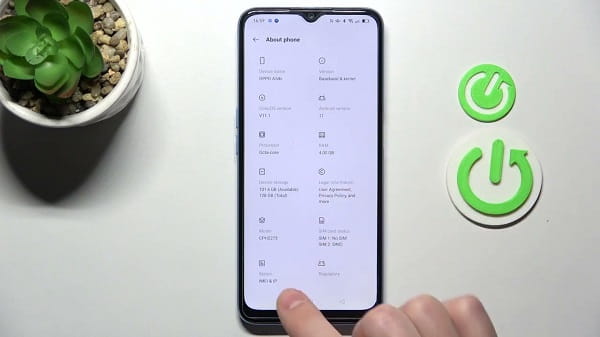
Open your phone and go to Settings. Scroll down until you see About Device — it’s usually near the bottom of the main Settings menu. Tap it.
The first thing you’ll see is the Device Name, which is the marketing name. Just below that is the Model Number — the alphanumeric code starting with CPH, PDM, or similar prefixes depending on the region. Note both down.
On phones running ColorOS 14 (which ships with the Reno15 and Find N6 series), the layout is slightly reorganised. If you don’t immediately see Model Number under About Device, tap Regulatory & Safety or look for a subsection called Device Info — the model code sits there.
Method 2: The Retail Box
Still have the box? It’s the most complete source of device information available outside of Oppo’s internal databases.
Turn the box over to the bottom or back panel. There’s a white printed sticker — sometimes it’s a label, sometimes it’s printed directly onto the packaging. It lists the Device Name, Model Number, IMEI number, serial number, and sometimes the region variant code. All of it in one place, no phone interaction required.
This method is particularly useful when you’re verifying a secondhand purchase before handing over money. The model number on the box should match exactly what appears in the phone’s Settings. If they don’t match, that’s worth investigating before completing the transaction.
Method 3: Dial *#06#
Fast and foolproof. Open the Phone app — the same one you use for calls — and type *#06# as if you’re dialling a number. Don’t press call. The information screen appears automatically.
This displays your phone’s IMEI number (or two IMEI numbers if it’s a dual-SIM device) along with the model number. The IMEI is your phone’s unique global identity code. It’s what Oppo’s warranty portal uses to verify coverage, what police use if a phone is reported stolen, and what carriers use to block a device if needed.
Keep a photo of this screen saved somewhere safe — separate from the phone itself. If the device is ever lost or stolen, you’ll need that IMEI number and won’t be able to retrieve it from the missing device.
Method 4: Engineer Mode via *#899#
When the display is cracked, the Settings app won’t load, or some software fault is blocking normal navigation, there’s a back-door method.
Open the Phone dialer and type *#899#. This launches Oppo’s built-in Engineer Mode — a factory diagnostic environment with a blue and white interface. Tap on Software Version inside the menu. The full model number and software build details appear there.
One important note: Engineer Mode became more restricted starting with ColorOS 13. On some newer Oppo devices, this code opens a limited version of the menu or requires additional verification. If it doesn’t show the Software Version option, the Settings method or the box sticker remains the reliable fallback.
Method 5: Check the Physical Device
No box, phone won’t turn on, Settings inaccessible, and the dialer isn’t working either? Check the phone’s body.
On older Oppo models, the model number is printed on a sticker inside the SIM tray slot. Eject the SIM tray using the provided pin (or a straightened paperclip). Look along the edges of the tray slot — some models have a small label printed there with the model identifier.
On newer models like the Find N6 and Reno15 series, Oppo has moved away from printing model numbers on the physical device. For those, the SIM tray label may only show regulatory marks and the serial number. Still worth checking, but the box or Settings remains more reliable for current-generation devices.
Verifying Your Model Online
Once you have your model number, you can cross-verify it on Oppo’s official support portal. Enter the model number and it returns the official device specifications, compatible ColorOS versions, available software updates, and warranty status if you also enter the IMEI.
This takes thirty seconds and is especially worth doing for secondhand purchases — it confirms you’re not holding a unit that’s been flagged, blacklisted, or has tampered software claiming to be a different model than it actually is.
FAQs
Q: What is the difference between model name and model number on Oppo phones?
A: The model name is the marketing name like “Reno15 Pro.” The model number is the internal code like CPH2651 — this is what service centres and software updates use for compatibility checks.
Q: My Oppo phone shows two IMEI numbers. Is that normal?
A: Yes. Dual-SIM Oppo phones have two IMEI numbers — one for each SIM slot. Both are valid identifiers for the same device.
Q: Can I check my Oppo model number without turning the phone on?
A: Yes. Check the retail box sticker or look inside the SIM tray slot for a printed label on older models.
Q: Does the *#899# code work on all Oppo models?
A: It works on most models but has limited functionality on devices running ColorOS 13 and above, where some diagnostic features are restricted.
Q: Why does my model number start with CPH?
A: CPH is Oppo’s standard prefix for international market variants. PDM prefixes are used for Chinese domestic market devices. The prefix indicates the regional variant of the hardware.